Desktop application that converts typed electron configurations into clean orbital box diagrams ready to copy into documents, worksheets, tests, and presentations.
Built for chemistry teachers, students, and anyone who needs textbook-style electron configuration charts quickly.
Creating electron orbital diagrams manually in Word or graphic editors is slow and repetitive.
This tool automates the process:
- type electron configuration text
- automatically format superscripts
- generate orbital charts instantly
- copy image to clipboard
- save as PNG
Perfect for educational workflows.
Automatically converts normal numbers into superscripts.
Example:
1s2 2s2 2p6
becomes:
1s² 2s² 2p⁶
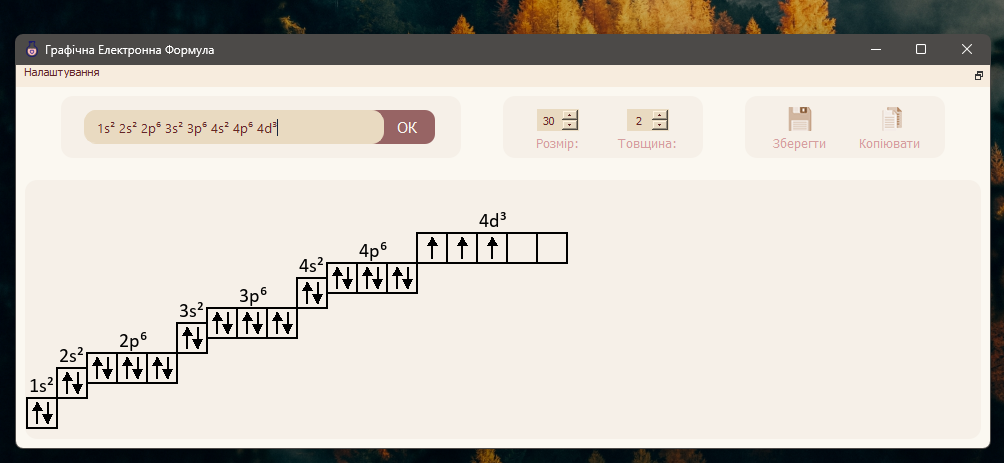
If you type only the final orbital, the application can auto-complete previous valid levels.
Example:
4d²
can expand into:
1s² 2s² 2p⁶ 3s² 3p⁶ 4s² 3d¹⁰ 4p⁶ 5s² 4d²
Creates textbook-style orbital box diagrams with electron arrows.
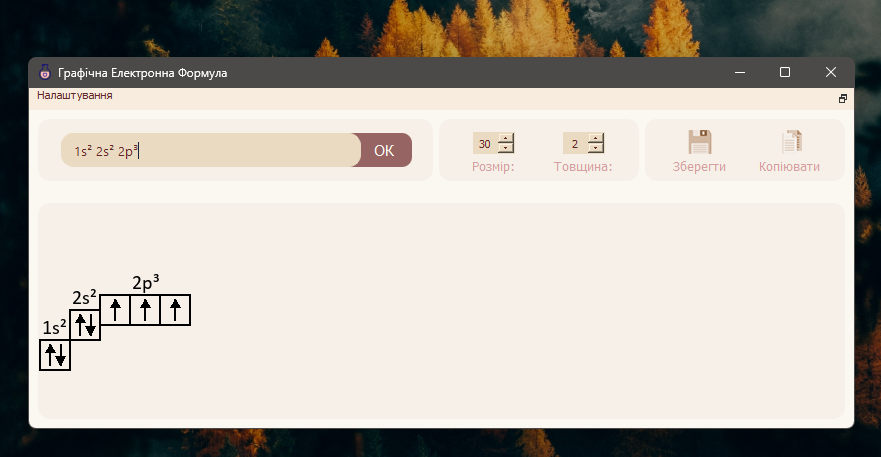
- Copy directly to clipboard
- Save as PNG image
Useful for:
- Microsoft Word
- PowerPoint
- Google Docs
- worksheets
- classroom presentations
Even if you do not know Ukrainian, the app is easy to use.
Main labels:
- Розмір = Size
- Товщина = Thickness
- Зберегти = Save
- Копіювати = Copy
- OK = Generate
That is enough to use the software comfortably.
- Download the release archive for your operating system
- Extract the archive
- Run the application
For proper text rendering, the Calibri font should be installed on your system.
- Python
- PyQt5
- Pillow (PIL)
- Chemistry teachers
- Students
- Tutors
- Schools
- Universities
- Educational content creators
This software was created to solve a real educational workflow problem where no practical tool existed.
It saves time, improves material quality, and automates repetitive manual work.
Developed by setbe.
MIT License